


UZURV Drive
4.7258.00 Reviews
App Specs
- Version
- 2.23.3
- Updated On
- License
- Free
- Downloads
- 100,000+
- Developer
- UZURV
- Categories
- Maps & Navigation
- Platform
- Android
Screenshots

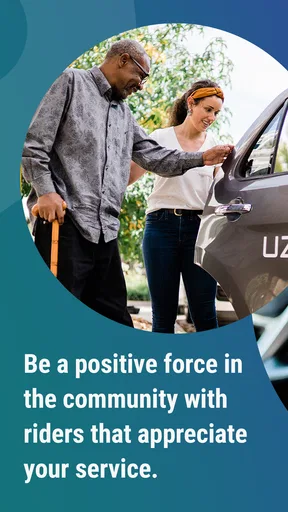
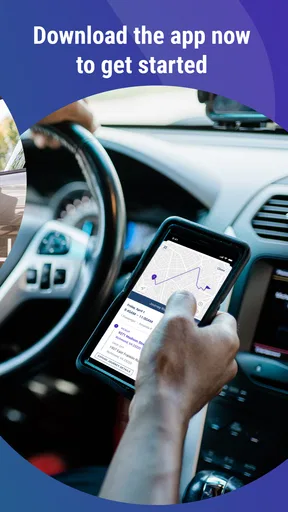
 Analysis by AppCompare
I came away from UZURV Drive with a fairly clear impression: it is aimed at people who want driving to serve a practical purpose beyond simply getting from one place to another. Developed by UZURV, this free Maps & Navigation app presents driving as a way to earn money while helping other people reach their destinations. That combination gives it a more focused identity than a standard navigation tool.
My main recommendation is straightforward. If you already drive and are interested in a service-oriented driving role, this is worth exploring. If you only want turn-by-turn directions, it is not the app I would choose first. The distinction matters because the app’s appeal is tied to the driver experience, not just to maps on a screen.
What using UZURV Drive feels like
The first thing I noticed is that UZURV Drive is best understood as a work companion rather than a general-purpose map replacement. Its store summary, “Drive & earn money doing good,” captures the intended balance: the driver is not merely completing trips, but taking part in a service that helps people travel. That purpose gives the app a different tone from ordinary navigation software.
In everyday use, I would approach it as one part of a driving routine. Before accepting a trip, I would want to be organized, have enough time, and be ready to pay attention to the passenger as well as the road. The app may help structure the driving side of that routine, but it does not remove the real-world responsibilities that come with transporting someone.
That is also where the app’s strongest quality lies. It speaks to drivers who want a clearer reason for taking trips. Some people are motivated mainly by flexible income, while others care more about providing dependable transportation to passengers who need extra consideration. UZURV Drive sits at that intersection, which makes it more purposeful than a generic driver app.
The app has built a solid audience since its release on Jul 3, 2018. It carries a 4.7 average from around 1.6 thousand ratings and has passed 100 thousand installs. Those figures suggest that the concept has found a receptive group, although they should not be treated as a guarantee that every driver will find the workflow equally comfortable.
A useful role for drivers who value consistency
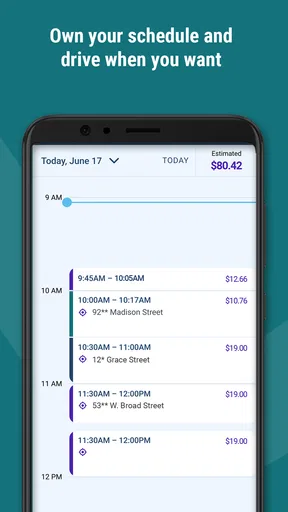
One practical strength is the way the app can fit into a repeatable schedule. Imagine a driver who has a few open hours in the morning and wants to use them for purposeful trips rather than waiting without a plan. A dedicated driving app can make that time feel more structured, especially when the driver is already comfortable navigating local roads and managing pickup details.
Worth Reading Before You Choose

EA SPORTS FC Mobile 26 Is a Bigger Football Game, but It Takes Time

Flipboard Shows What News Apps Must Do Beyond the Feed

Switching to Android Auto Means Rethinking Your Driving Routine

Google Calendar Makes a Crowded Week Easier to Manage

Ludo King Makes the Most of the Minutes Between Plans

Baby Panda World Brings Quick Play to Modern Phones, but Its Game Library Feels Busy
The benefit is not simply earning while driving. The more meaningful advantage is having a reason to be attentive and prepared. A driver who treats each trip as a service interaction is likely to think ahead about timing, communication, vehicle readiness, and the passenger’s comfort. UZURV Drive’s identity encourages that mindset, even though the app itself cannot replace good judgment.
I also see value for someone who dislikes the impersonal feel of ordinary gig-driving platforms. Many driving services emphasize speed, volume, and constant availability. UZURV Drive’s positioning feels more suitable for a person who prefers a calmer, more deliberate approach. That does not mean every trip will be simple, but it does suggest a different kind of relationship between driver and passenger.
Where it differs from ordinary navigation apps
Google Maps, Apple Maps, and similar tools are designed to help almost anyone find a route. They are excellent choices when the question is, “How do I get there?” UZURV Drive addresses a different question: “How do I participate as a driver in this service?” Comparing the two directly is therefore a little unfair. A navigation app may be better for exploring routes, checking traffic, or planning a personal journey, while this app is more relevant when driving itself is the activity.
That difference creates an important trade-off. A general map app usually offers a broad set of travel tools and is familiar to nearly every smartphone user. UZURV Drive is narrower, but that narrower purpose can be an advantage if it keeps the driver focused on the work at hand. I would not install it as my only navigation solution. I would treat it as a specialized tool for the driving role and keep a conventional map app available for route context when needed.
This is one of the less obvious points about choosing it: specialization can reduce clutter, but it can also mean that the app does not satisfy every travel need. Drivers who expect one application to handle personal navigation, trip work, route research, and every possible road situation may feel constrained. People who prefer a dedicated tool for the driving side may appreciate the clearer focus.
The small habits that make the experience better
My first practical tip would be to separate preparation from driving. Review what you need to know before moving the vehicle, then keep your attention on the road. Constantly reaching for a phone creates unnecessary friction, particularly when the trip involves a passenger who may need reassurance or extra patience.
A second useful habit is to leave room for real-world delays. A route that looks short on a map can still involve finding a safe stopping point, confirming the pickup, or allowing a passenger to settle in comfortably. Drivers who schedule every minute too tightly may find the experience stressful. The service-oriented nature of UZURV Drive makes a little breathing room especially valuable.
A third insight is that the app should be judged by the entire workflow, not by the map view alone. The quality of a driver platform depends on how naturally it fits between accepting a trip, preparing for pickup, navigating, completing the ride, and moving on to the next task. I would spend time learning that sequence before committing to a regular routine. A tool can look simple and still feel awkward if its steps interrupt the way you drive.
Finally, I would keep personal and work driving mentally separate. When I am using an app for a driving role, I want to know why I opened it and what I am trying to accomplish. That simple discipline makes it easier to avoid distractions and to notice when the platform is helping rather than adding another layer of screen time.
The most meaningful limitation
The biggest limitation is the app’s narrow audience. UZURV Drive is not an obvious choice for someone who wants a normal navigation app, a travel planner, or a tool for occasional road trips. Its value depends on being interested in the driver side of a transportation service. Without that interest, the app’s central purpose may feel distant from everyday needs.
There is also a human limitation that no app can solve. Driving passengers requires reliability, patience, safe decision-making, and the ability to handle situations that do not fit neatly into a digital workflow. A driver may still face delays, unclear pickup circumstances, route changes, or communication challenges. The app can be part of the process, but it cannot make those situations disappear.
That matters when comparing it with a standard map application. A general navigation tool is usually the safer recommendation for someone who wants predictable route guidance without taking on a service role. I would choose UZURV Drive only when the earning opportunity and the social purpose of the driving work are both relevant to me.
Another point worth considering is device compatibility. The current version is 2.23.3, and the app requires iOS or Android 10 or later. That is not an issue for many recent phones, but anyone using an older device should check the operating system before planning around it. A driver depends on reliable access, so compatibility is something to settle before building a schedule around the app.
Who should give it a serious look?
I think the best audience is an existing driver who wants a more purposeful way to use available time. That person is likely to appreciate the combination of driving, earning, and helping passengers. The app also makes sense for someone who prefers a structured service environment over the open-ended feel of ordinary ride-hailing work.
It may suit drivers who are comfortable with technology but do not want to spend their entire day experimenting with complicated tools. The free price removes one barrier to trying it, while the Everyone content rating makes it broadly approachable as an app. Still, the practical fit depends much more on the driver’s goals than on those store details.
I would be more cautious about recommending it to a person who is brand new to passenger driving and expects the application to teach every part of the job. A transportation app can support a workflow, but it cannot substitute for preparation, local road knowledge, calm communication, and responsible driving habits. Someone who wants a completely hands-off experience should look elsewhere.
I would also skip it if my only requirement were occasional directions. For a weekend trip, a visit to an unfamiliar neighborhood, or a quick route comparison, a conventional map app is likely to be more useful. UZURV Drive earns its place when the driver’s role is central, not when navigation is merely a small part of a personal journey.
Questions I would ask before relying on it
One natural question is whether the app is free to install. Yes, UZURV Drive is listed as free, which makes trying it less risky from a purchase standpoint. I would still evaluate the time and effort involved in becoming comfortable with the workflow, because the real commitment for a driver is not the download itself.
Another question is whether it is suitable for every phone. The minimum operating-system requirement is Android 10 or later, or the corresponding supported environment on iOS. If the phone is older, I would check compatibility before depending on the app during working hours. A second device or backup plan may also be sensible for anyone whose income depends on staying connected.
People may also wonder whether it replaces their usual map app. In my view, it should not automatically be treated that way. Its role is specialized around driving with UZURV, while general map tools remain useful for broader route planning and personal travel. Keeping both types of tool available can be more practical than forcing one app to do everything.
A further question is whether the app is a good fit for someone who does not enjoy interacting with passengers. Probably not. The point of the service is not just moving a vehicle; it involves helping people travel. Drivers who prefer completely solitary work may find that the human side of the role outweighs the convenience of the app.
Finally, I would ask whether a high rating guarantees a smooth personal experience. It does not. The 4.7 average and roughly 1.6 thousand ratings are encouraging signs of user satisfaction, but driving conditions, phone setup, local routines, and personal expectations can change the experience considerably. I would use the rating as a reason to try the app, not as a promise that it will suit every driver.
My verdict after weighing the trade-offs
UZURV Drive has a clear thesis, and I think that clarity works in its favor. It is not trying to be another all-purpose map. It is built around the idea that driving can combine income with a useful service to other people. For the right driver, that focus is more valuable than a long list of unrelated travel features.
Its strongest evidence is the way its purpose can shape a better driving routine: prepare before moving, allow time for passengers, use navigation as part of a larger service workflow, and treat each trip as more than a simple route. Those are practical benefits that do not appear in a short store description, but they are central to deciding whether the app belongs in a driver’s routine.
Its weakness is equally clear. It is specialized, and specialization means it will not be the right answer for casual navigation or for drivers who want an entirely effortless experience. The app can organize part of the work, but it cannot remove the responsibility, patience, and attention that passenger driving demands.
For me, the final recommendation is positive but specific: UZURV Drive is worth trying when you want driving to be both an earning activity and a meaningful service. I would recommend it to prepared drivers who value that combination, while pointing occasional travelers and navigation-only users toward a conventional map app instead. That focused audience is not a flaw; it is the reason the app can feel useful when it matches your goals.
Pros
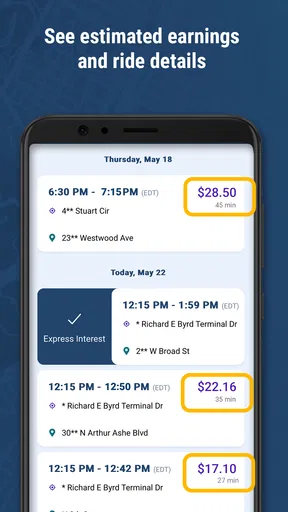
- Simple trip details help drivers prepare before accepting a ride.
- Clear pickup and drop-off information can reduce navigation mistakes.
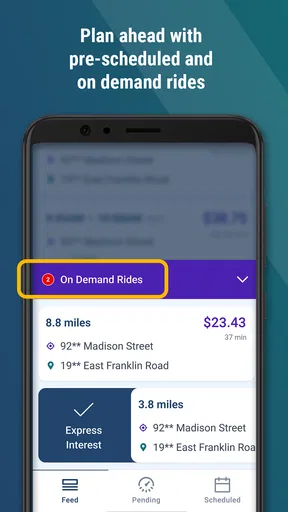
- Useful for drivers managing scheduled transportation assignments.
- Designed for specialized rides
- including passengers needing extra assistance.
- Driver-focused layout keeps essential trip information easy to find.
Cons
- Availability depends heavily on UZURV operating in your local area.
- Some assignments may require extra patience and accessibility awareness.
- The app may be less useful without an active driver account.
- Trip volume can vary significantly by location and time of day.
- Drivers may need to use a separate navigation app for route guidance.
FAQs for UZURV Drive
What is UZURV Drive and who is it designed for?
UZURV Drive is a driver-focused application connected to the UZURV transportation platform. It is intended for approved drivers who provide scheduled or on-demand rides, including transportation for riders with specific mobility or accessibility needs. The app can help drivers view trip information, manage assignments, navigate to pickup and drop-off locations, and keep track of completed work, depending on the services available in their area.
Do I need to be an approved UZURV driver before using the app?
Yes. UZURV Drive is not generally a standard passenger ride-booking app that anyone can open and use immediately. Drivers normally need to apply, meet UZURV or local transportation-provider requirements, and receive account approval before they can access trip assignments. Requirements may include background checks, vehicle documentation, insurance, licensing, training, and other eligibility conditions that vary by location and contract.
What information and permissions does UZURV Drive require?
During setup and while completing trips, UZURV Drive may request access to information such as your account details, vehicle or driver profile, trip status, and location. Location access is particularly important because the platform may use it to support navigation, confirm arrival, and track trip progress. Review the permission prompts carefully, enable only what is necessary, and check your device settings if a feature does not work correctly.
Can UZURV Drive be used without an internet connection or GPS?
The app relies on an active internet connection and location services for many important functions, including receiving assignments, updating trip status, communicating relevant pickup information, and reporting progress to the platform. Navigation may sometimes continue briefly when a connection is weak, but offline use should not be assumed. Before starting a shift, make sure your phone is charged, GPS is enabled, and mobile data is working.
Is UZURV Drive available on both Android and iPhone?
Availability can depend on the current UZURV program, your region, and whether you are an authorized driver. If a compatible Android or iPhone version is offered, download it through the official Google Play Store or Apple App Store rather than from unofficial websites. Check the store listing for supported operating-system versions, required permissions, recent updates, and any organization-specific instructions provided during driver onboarding.


